Fish vs Structure vs Weeds: How to Read Your Sonar Like a Pro
One of the most common challenges for anglers is figuring out what’s fish and what’s underwater structure or weeds. Misreading sonar can waste hours and leave you frustrated.
This summary will teach you:
How to identify fish arches and blobs
How weeds and vegetation appear on your screen
How to spot rocks, logs, and other underwater structure
Tips for using Side Imaging, Down Imaging, and CHIRP sonar
By the end, you’ll be able to quickly distinguish fish from everything else, save time on the water, and increase your catch rate.
SECTION: IDENTIFYING FISH
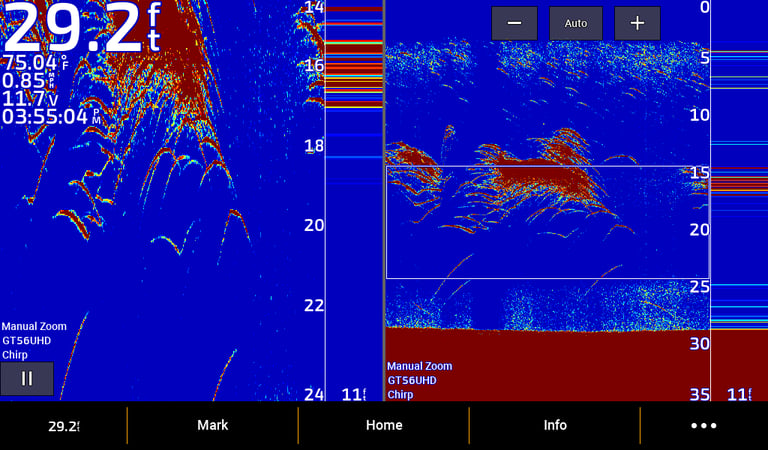
Fish usually appear as arches or small blobs on 2D / CHIRP sonar. On Side Imaging, fish may appear as small suspended targets casting shadows on the bottom.
Tips for beginners:
Fish arches are curved marks moving across the screen
Suspended fish appear off the bottom in Side Imaging
Observe the size, movement, and density to distinguish schools from individual fish
How to read sonar = for detailed sonar reading
2D CHIRP sonar showing clear fish arches with beginner settings
SECTION: RECOGNIZING WEEDS & VEGETATION
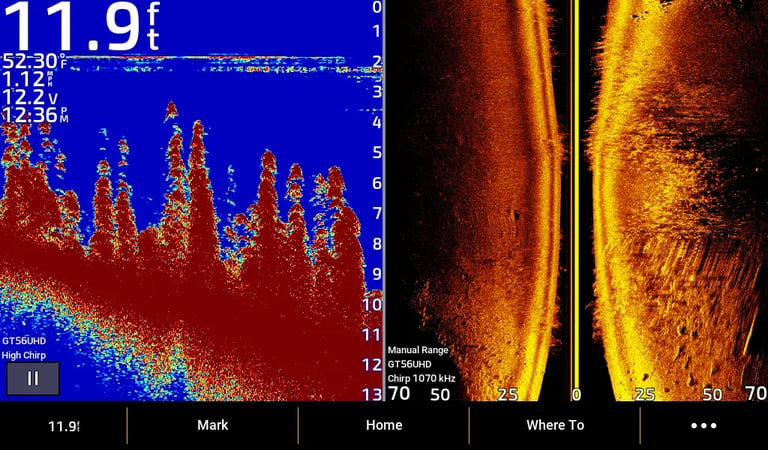
Weeds and vegetation are one of the most misread elements on sonar. Key characteristics:
Fuzzy, tall vertical marks rising from the bottom
Often connected to the bottom
Can create a wall or canopy
Do not form arches like fish
Pro tip: Use Side Imaging to see the shape of weed edges — fish often hang just outside weed beds.
Weed bed appearing as fuzzy vertical marks on Side Imaging sonar (right) and 2D (left)
SECTION: UNDERSTANDING STRUCTURE
Down Imaging is excellent for seeing fish directly under the boat. Beginner tips:
Frequency: Usually 800 kHz for shallow water, 455 kHz for deeper water
Range: Auto mode works, adjust if fish are missed
Contrast: Slightly higher than side imaging to see details
Boat Speed: Slow to moderate for jigging or tight spots
Links:
Down imaging → full Down Imaging tutorial
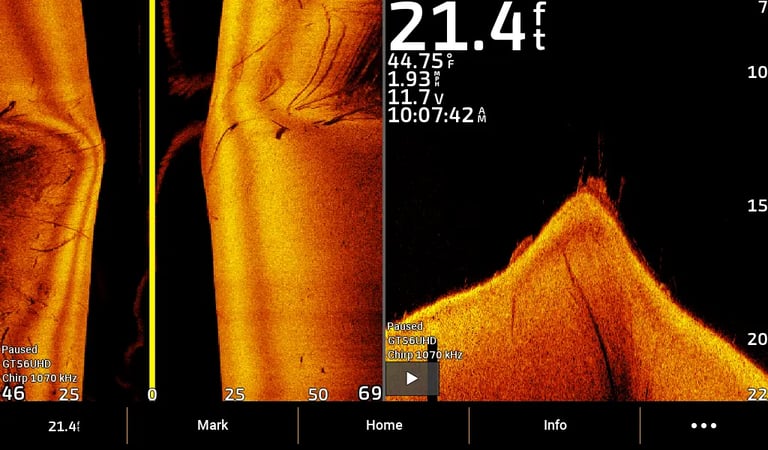
Various Structures
Structures on Side Imaging Sonar (left)
Hard objects like rocks, brush piles, or submerged trees reflect strong signals show up bright on screen.
Structures on Down Imaging Sonar (right)
Can see fine details of objects like branches, rocks, and drop-offs.
SECTION: COMMON MISTAKES
Many anglers confuse fish, weeds, and structure. Avoid these mistakes:
Chasing every arch you see → not all are fish
Assuming all fuzzy marks are weeds → some may be baitfish
Ignoring shadows → they reveal size and position of fish and structure
Wrong sonar settings → can hide fish or exaggerate weeds
SECTION: SIDE IMAGING & DOWN IMAGING TIPS
Side Imaging: Great for identifying fish along weed edges and structure. Look for shadows to confirm targets.
Down Imaging: Helps spot fish directly under the boat in dense vegetation.
2D CHIRP: Confirms size and depth of fish.
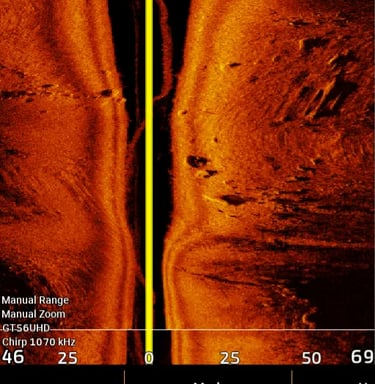
Walleye on Side Imaging
Bright, elongated shape slightly above the bottom.
Often accompanied by a dark shadow behind it, which helps indicate how far it is from the bottom.